
A business website is more than just an online presence. It represents a company’s brand, provides information to customers, generates enquiries, and supports daily business operations. As businesses grow, their website may eventually need improvements, such as a new design, better performance, updated technology, or a more flexible platform.
This is where website migration becomes necessary.
Website migration refers to the process of moving a website from one environment to another. This may involve changing hosting providers, moving to a new content management system, upgrading website technology, changing domain structures, or redesigning an outdated website.
Although website migration can improve website performance and user experience, it is not a simple process. Poor planning can result in broken pages, lost content, SEO ranking drops, slow loading speeds, and even website downtime.
A professionally planned website migration ensures that the transition happens smoothly while protecting valuable website data, search visibility, and customer experience.
What Is Website Migration?
Website migration is the process of making major changes to a website that affect its structure, technology, location, or functionality.
Many people assume migration only means moving a website to a new hosting provider, but it can involve several different changes.
Common types of website migration include:
Hosting Migration
Moving a website from one hosting provider to another for better performance, reliability, or support.
Platform Migration
Changing the website’s content management system (CMS) or technology platform.
For example, a business may move from an outdated system to a more modern platform that offers better flexibility and security.
Website Redesign Migration
Updating an old website with a new design, improved structure, and better user experience while transferring existing content.
Domain Migration
Changing the website domain name while maintaining website accessibility and search engine visibility.
HTTP to HTTPS Migration
Moving from a non-secure website connection to HTTPS to improve security and customer trust.
Each type of migration requires careful planning to avoid technical problems.
Why Businesses Need Website Migration
Businesses usually consider website migration when their existing website no longer meets their needs.
Common reasons include:
- Outdated website design
- Slow website performance
- Poor mobile experience
- Limited website features
- Difficulty managing content
- Security concerns
- Poor SEO performance
- Business growth requiring better technology
An old website may still function, but it may prevent businesses from providing the experience modern customers expect.
A properly planned migration allows businesses to improve their website while protecting important assets such as existing content, traffic, and search rankings.
The Risks of Poorly Planned Website Migration
Website migration involves many technical details. Without proper planning, small mistakes can create major problems.
Some common risks include:
Loss of SEO Rankings
Search engines need time to understand website changes.
If URLs, page structures, or important website elements are changed incorrectly, search engines may struggle to index the new website.
This can result in:
- Lower search rankings
- Reduced organic traffic
- Fewer website enquiries
- Loss of online visibility
A professional migration process includes SEO planning to help preserve existing rankings.
Broken Website Pages
During migration, website files, links, and page structures need to be transferred correctly.
Without proper checking, visitors may encounter:
- Broken links
- Missing pages
- Incorrect redirects
- Images not loading
- Website errors
Broken pages create a poor user experience and may reduce customer trust.
Data Loss
A website contains valuable information such as:
- Website content
- Images
- Customer information
- Product details
- Blog articles
- Website settings
Without proper backup and transfer procedures, important data may be lost during migration.
Professional migration planning includes reviewing and protecting all essential website information before changes are made.
Why Planning Is the Most Important Step
Successful website migration starts with preparation.
Before making any changes, businesses should evaluate:
- Current website structure
- Existing website content
- SEO performance
- Important pages
- Website functionality
- Technical requirements
A detailed migration plan helps identify possible issues before they affect the live website.
This preparation reduces downtime, prevents unnecessary errors, and creates a smoother transition
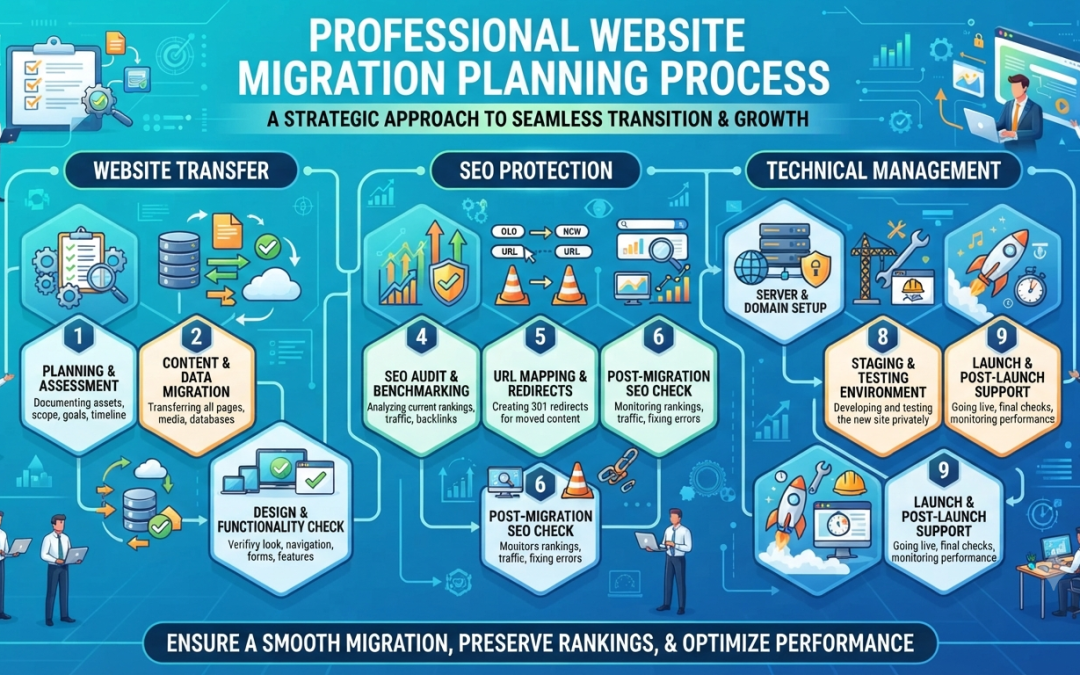
Important Steps in a Professional Website Migration
A successful migration involves several important stages.
1. Website Audit Before Migration
The first step is understanding the current website condition.
A website audit helps identify:
- Existing pages
- Important URLs
- Current rankings
- Website performance issues
- Technical problems
This information becomes a guide for planning the migration process.
2. Creating a Website Backup
Before any major changes are made, a complete website backup should be created.
A backup protects important website data and provides a recovery option if unexpected problems occur.
This includes:
- Website files
- Databases
- Images
- Content
- Configuration settings
Having a reliable backup reduces risks during the migration process.
3. Planning URL Changes
Website URLs are important for both users and search engines.
If URLs change during migration, proper redirects should be prepared to guide visitors and search engines to the correct pages.
Poor URL planning can lead to:
- Broken links
- Lost rankings
- Reduced website traffic
A professional migration plan carefully manages all URL changes.
How Website Migration Affects SEO
SEO should be considered throughout the migration process.
Many businesses focus only on design and functionality but forget that their website already has search engine value.
A website may have:
- Existing keyword rankings
- Indexed pages
- Backlinks
- Organic traffic
Without proper SEO migration planning, these benefits may be lost.
Professional migration helps maintain:
- Search engine visibility
- Existing rankings
- Website authority
- Organic traffic performance
How Professionals Maintain SEO During Migration
A website migration should never be treated as only a design or technical project. SEO plays an important role in ensuring that the new website continues performing well after the transition.
Professional migration planning includes several SEO considerations, such as:
Redirect Management
When website URLs change, redirects help guide users and search engines from old pages to new pages.
Proper redirects help:
- Preserve existing SEO value
- Prevent broken links
- Maintain user experience
- Reduce ranking losses
Without correct redirect planning, valuable pages may disappear from search results.
Maintaining Website Content
Existing website content often contributes to search engine rankings.
During migration, important content should be reviewed and transferred properly.
This includes:
- Service pages
- Blog articles
- Images
- Meta titles
- Meta descriptions
- Internal links
Removing valuable content without planning can negatively affect website visibility.
Testing Before Launch
Before a migrated website goes live, professional testing is essential.
Testing helps identify problems such as:
- Broken links
- Missing images
- Mobile display issues
- Slow loading pages
- Form errors
- Security problems
A proper testing process ensures customers experience a smooth website after migration.
How Website Migration Improves Business Performance
Although website migration requires careful planning, it provides many long-term benefits when completed correctly.
A successful migration can help businesses achieve:
Better Website Speed
Older websites often use outdated technology that affects loading speed.
Migration allows businesses to improve website performance by using better hosting, updated systems, and optimized website structures.
A faster website provides:
- Better user experience
- Higher customer engagement
- Improved SEO performance
- More enquiries
Improved Website Security
Older websites may have outdated software, plugins, or security weaknesses.
A professional migration allows businesses to upgrade their website environment and implement better security practices.
Improved security helps protect:
- Business data
- Customer information
- Website functionality
- Brand reputation
Better Website Management
Modern website platforms make it easier for businesses to update content, manage pages, and maintain their online presence.
A successful migration can provide:
- Easier content updates
- Better website flexibility
- Improved features
- More efficient management
This allows businesses to keep their website updated as their needs continue to grow.
Common Website Migration Mistakes to Avoid
Many website migration problems happen because businesses rush the process or skip important preparation steps.
Common mistakes include:
Not Creating a Backup
Without a backup, businesses risk losing valuable website data if unexpected issues occur.
Ignoring SEO
Changing website structure without considering SEO can cause ranking drops and traffic loss.
Migrating Without Testing
Launching a website without proper testing may result in broken pages, technical errors, and poor customer experience.
Changing Too Many Things at Once
A complete redesign, platform change, and URL restructuring at the same time can make it difficult to identify problems.
A planned migration process helps manage changes more effectively.
Choosing the Wrong Migration Approach
Every website has different requirements.
A small business website, e-commerce website, and corporate website may require different migration strategies.
Professional advice helps businesses choose the right approach based on their goals.
Why Businesses Should Work With Website Migration Experts
Website migration involves both technical and strategic decisions.
A professional web team understands how to manage:
- Website files
- Hosting environments
- Website structures
- SEO requirements
- Performance improvements
- Security considerations
Working with experienced professionals reduces risks and ensures the migration process is completed correctly.
Instead of dealing with unexpected website issues after migration, businesses can enjoy a smoother transition and a stronger online presence.
When Should Businesses Consider Website Migration?
Businesses should consider website migration when their current website starts limiting growth.
Signs that migration may be needed include:
- Website loading slowly
- Website design looks outdated
- Difficult content management
- Poor mobile experience
- Limited website features
- Security concerns
- Declining SEO performance
- Need for better website functionality
A professional evaluation can help determine whether migration is the right solution.
Conclusion
Website migration is an important process that allows businesses to improve their online presence, upgrade technology, and create a better experience for customers. However, without proper planning, migration can result in SEO losses, broken pages, data issues, and website downtime.
A professional website migration approach focuses on careful preparation, data protection, SEO preservation, testing, and performance improvement. By working with experienced web professionals, businesses can successfully transition to a better website environment while protecting their existing online value.
Whether a business needs a website redesign, hosting change, platform upgrade, or complete website improvement, proper migration planning ensures a smoother and safer process.
FAQs
1. What is website migration?
Website migration is the process of moving or making major changes to a website’s structure, platform, hosting environment, or domain. It can include redesigning an old website, changing hosting providers, upgrading website technology, or moving to a new content management system. Proper planning helps ensure the website remains functional and maintains its search engine visibility.
2. Will website migration affect SEO rankings?
Yes, website migration can affect SEO rankings if it is not handled properly. Changes to URLs, website structure, content, and technical settings may impact how search engines understand the website. A professional migration process includes SEO planning, redirect management, and testing to help preserve existing rankings and organic traffic.
3. How long does a website migration take?
The time required for website migration depends on the size, complexity, and goals of the website. A simple website transfer may take a shorter time, while a large business website with many pages, features, and SEO requirements requires more planning, testing, and implementation.
4. Why should businesses hire professionals for website migration?
Professional website migration requires technical knowledge, SEO understanding, and careful planning. Experts can help prevent common issues such as data loss, broken pages, downtime, and ranking drops. They ensure the migration process is completed safely while improving the website’s performance and reliability.
5. What should businesses prepare before migrating a website?
Before migration, businesses should review their current website, identify important pages, create backups, analyse SEO performance, and define their migration goals. Proper preparation helps reduce risks and ensures important content, functionality, and search visibility are protected during the transition.