
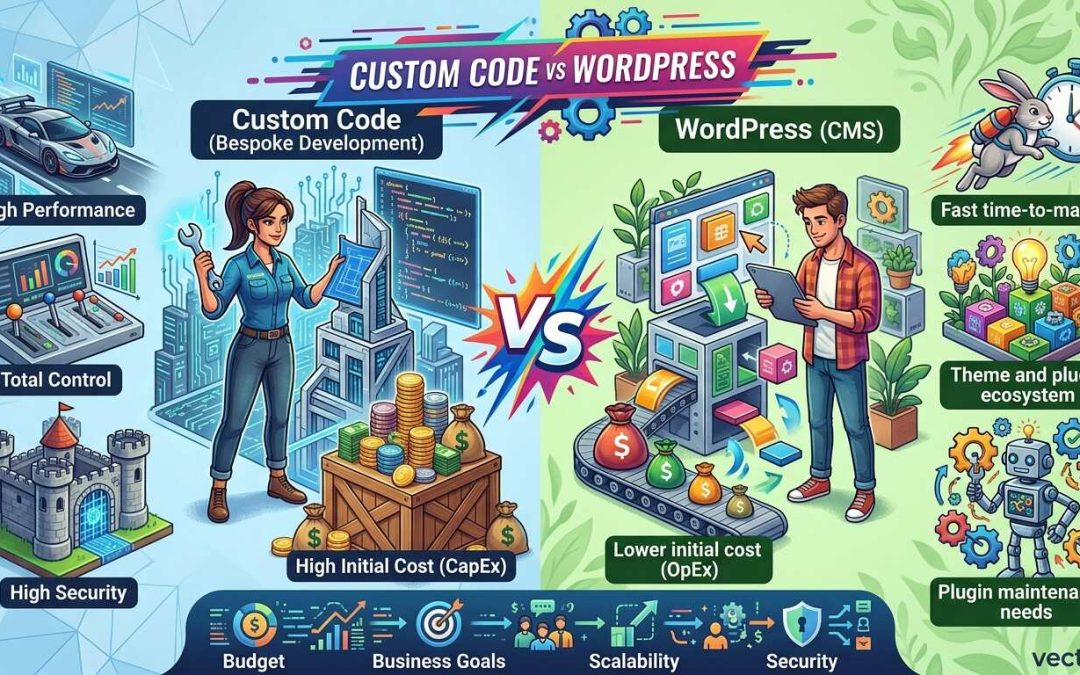
A website is more than just a digital business card; it is the engine of your modern business. Whether you run a small e-commerce store or a large enterprise, your digital presence dictates your reach and revenue. As we move through 2026, the technology landscape has evolved significantly. Businesses often face a critical decision early on: should you build a website using a Content Management System (CMS) like WordPress, or should you invest in custom code?
Many businesses struggle with this choice because they focus only on the initial cost. However, hidden factors like long-term scalability, security vulnerabilities, and maintenance overhead can make or break your digital strategy. Choosing the wrong platform can lead to costly redesigns or technical debt down the line. In an era where user experience and page speed are paramount for search engine rankings and customer retention, the stakes have never been higher.
This is why understanding the difference between custom code and WordPress is essential for protecting your investment and ensuring long-term business agility. It is not merely a technical decision; it is a strategic business decision that impacts your marketing, sales, and operational efficiency.
A clear comparison helps identify the best approach before you commit resources, allowing business owners to take strategic action through proper planning, development, or migration when necessary.
What Is the Difference Between Custom Code and WordPress?
The debate between custom code and WordPress is essentially a choice between a bespoke tailored suit and a high-quality modular outfit. Both can look great, but they serve different purposes and require different levels of maintenance.
Custom Code (Bespoke Development)
This involves writing code from scratch using languages like HTML, CSS, JavaScript, Python, or PHP. It is built specifically for your business logic, without the constraints of a pre-existing platform. Think of this as building a house from the ground up—you choose every brick, beam, and fixture. You have total control over the architecture, but you are also responsible for every structural element.
WordPress (CMS)
WordPress is a pre-built platform that powers over 40% of the web. It uses themes and plugins to assemble a website. It is highly customizable but relies on a core codebase maintained by the WordPress community. Think of this as renovating a pre-built structure. The foundation and walls are already there, and you are painting, decorating, and adding extensions to fit your needs.
During the decision-making process, stakeholders should examine various factors, including:
-
Business Goals (Scalability vs. Speed to market)
-
Budget Constraints (CapEx vs. OpEx)
-
In-house Technical Expertise
-
Security Requirements
-
Integration Needs (CRM, ERP, Legacy Systems)
-
Traffic Volume Expectations
-
Content Update Frequency
-
Long-term Maintenance Strategy
The goal is to determine which approach presents the lowest risk and highest ROI for your specific operational needs. For instance, a simple brochure site for a local bakery has vastly different requirements than a SaaS platform handling thousands of transactions per minute.
Why This Choice Is Important
Not every business needs the complexity of custom code, and not every business can survive the limitations of a standard WordPress setup.
Some limitations of WordPress remain hidden until you hit high traffic volumes or complex integration requirements that plugins cannot handle. Conversely, custom code can become a burden if you do not have the budget to maintain it or the staff to update it.
Making the right choice helps business owners:
-
Avoid Technical Debt
-
Ensure Site Speed and Performance
-
Reduce Security Risks
-
Protect Long-term ROI
-
Improve User Experience (UX)
-
Plan Future Scalability
Early strategic planning often prevents costly emergency migrations or complete rebuilds later. The goal is to align your technology stack with your business trajectory, ensuring that your website is an asset, not a liability.
Identifying Hidden Challenges
Professional consultation can identify problems that are difficult to detect without technical training.
Common hidden challenges include:
-
Plugin Bloat (Slowing down WordPress sites)
-
Security Vulnerabilities (In plugins or outdated cores)
-
Scalability Ceilings (Custom code handling millions of requests)
-
Maintenance Costs (Updating custom code vs. WordPress updates)
-
Vendor Lock-in
-
SEO Limitations (Poor structure in custom builds)
-
Hosting Compatibility Issues
These issues may significantly impact your business even if the website looks good on the surface. For example, a WordPress site loaded with 50 plugins might look fine to a visitor but could be suffering from severe database bloat, leading to slow load times that drive customers away.
Protecting Your Investment
Websites handling sensitive customer data, payments, or proprietary information require robust architecture.
Without the proper approach, unstable websites may cause:
-
Data Breaches
-
Loss of Revenue
-
Poor Search Engine Rankings
-
Site Downtime During Traffic Spikes
-
Incompatibility with New Tools
-
High Emergency Maintenance Bills
Strategic development helps reduce these risks by recommending the appropriate architecture before launch. Security is not a feature you add later; it is a foundational element of your web development approach.
Supporting Business Growth
The choice of technology is not just about the present; it is about the future.
It also helps improve overall operational efficiency.
Specialists may recommend:
-
Headless WordPress (Combining the two approaches)
-
API-First Development
-
Microservices Architecture
-
Performance Optimization
-
Security Hardening
-
Cloud Infrastructure Scaling
A well-chosen stack is generally stronger, safer, and more resistant to market changes. For instance, a Headless WordPress setup allows you to use the familiar WordPress backend for content management while using a custom JavaScript framework (like React or Vue) for the frontend, offering the best of both worlds: ease of use and high performance.
The Importance of Regular Maintenance
Routine maintenance works together with the initial build to ensure long-term stability.
Services may include:
-
Core and Plugin Updates (WordPress)
-
Code Refactoring (Custom)
-
Security Audits
-
Database Optimization
-
Bug Fixing
-
Performance Monitoring
Regular maintenance reduces unnecessary stress on your servers and helps extend the lifespan of your digital assets. Neglecting maintenance is like never changing the oil in your car; eventually, the engine will seize.
Why Traffic Spikes Increase Risks
Viral marketing, product launches, or seasonal sales can stress a website even when damage is not immediately visible.
Traffic spikes may cause:
-
Server Crashes
-
Database Connection Errors
-
Slow Load Times
-
Checkout Failures
-
Security Timeouts
A professional architecture review before peak seasons helps identify hidden bottlenecks before a crash causes revenue loss. Custom code often handles high traffic better if optimized correctly, while WordPress requires robust caching and hosting solutions to survive sudden spikes.
Enterprise Businesses Benefit from Custom Code
Large organizations often have complex requirements that standard CMS platforms cannot meet.
Enterprises often require:
-
Custom ERP Integrations
-
High-Level Security Compliance
-
Unique User Dashboards
-
Multi-language/Multi-currency Support
-
Legacy System Compatibility
-
High-Volume Transaction Processing
Custom solutions help enterprise managers reduce liability risks while maintaining a competitive edge. Preventive architecture also minimizes unexpected disruptions caused by platform limitations. When you are dealing with millions of users, every millisecond of latency counts, and custom code allows for granular optimization that plugins cannot achieve.
When Should You Choose Which?
Business owners should consider their approach when:
-
Traffic is expected to be extremely high
-
You need unique, complex functionality
-
Budget allows for higher upfront investment
-
You need to launch quickly on a tight budget
-
Content updates are frequent and simple
-
You rely on a specific ecosystem of plugins
-
Security requirements are standard
-
You have in-house developers
Regular assessments are especially important for scaling businesses located in competitive niches.
Why Professional Assessments Are Better Than DIY
While business owners can identify obvious needs, many technical architectural defects require professional knowledge and experience.
Development specialists understand:
-
Code Efficiency
-
Database Structures
-
Security Protocols
-
SEO Best Practices
-
User Experience Design
-
Risk Evaluation Techniques
They also use specialized tools and follow industry best practices to provide accurate recommendations. Professional assessments reduce guesswork and help business owners make informed decisions.
Conclusion
Choosing between custom code and WordPress is a critical part of responsible business management. It helps identify hidden costs, improve site health, and reduce the risk of failure before it occurs.
Whether for residential portfolios, commercial buildings, or enterprise platforms, the right approach provides valuable information that supports safer digital landscapes and healthier growth. Combined with professional maintenance and security services when necessary, the right development choice helps protect both your business and your customers while preserving the long-term value of your digital presence.
FAQs
1. What is the main difference between custom code and WordPress?
Custom code is built from scratch specifically for your needs, offering maximum flexibility but requiring higher initial investment. WordPress is a pre-built CMS that uses themes and plugins, offering faster deployment and lower initial costs but with some limitations on highly unique functionality.
2. How often should a website be inspected?
The inspection frequency depends on the site’s age, traffic, and complexity. High-traffic sites, sites handling sensitive data, and sites that have recently undergone major changes should be inspected regularly to identify potential performance or security issues.
3. Can a good-looking WordPress site still be dangerous?
Yes. Some sites may appear healthy on the outside while hiding plugin vulnerabilities, slow database queries, or structural weaknesses. A professional code audit can detect these hidden issues and recommend the best course of action to prevent crashes or data breaches.
4. When should I arrange a professional web development assessment?
You should consider scheduling an assessment if your site is slow, frequently crashes, shows signs of security issues, has suffered a traffic spike, or if your business goals have outgrown your current platform. Regular reviews are also recommended as part of a preventive maintenance plan.
5. What happens after a development assessment?
After completing the assessment, the specialist will explain the condition of your website and recommend suitable solutions. Depending on the findings, this may include optimizations, security patches, a migration to a new platform, or a custom build to improve performance and safety.